Making SAP patch reboots boring: ordered, health-gated stop/start automation
Replacing a fragile, multi-team manual runbook with a single script that stops and starts SAP layers in the order the SAP team requires — and refuses to continue if any layer is unhealthy.
- My role
- Design, implementation and rollout (Tech Lead, Unix team)
- Period
- 2026
- Scale
- SAP landscapes across Dev, QA and Prod on RHEL
- Stack
- Bash, sapcontrol, RHEL, systemd, Ansible
Context
Monthly OS patching on our RHEL estate included servers running SAP. The SAP subject-matter experts (SMEs) had a firm requirement: SAP layers must be stopped top-down — application servers, then central services, then the database — and started again bottom-up, with each layer confirmed healthy before the next one is touched.
In practice this meant a Unix engineer and an SAP engineer on a bridge call, stepping through a document, typing commands by hand on several hosts, and eyeballing output. It worked, but it was slow, depended on who was on shift, and the riskiest moment — starting application servers before the database was really ready — relied on human judgement at 2 a.m.
The problem, stated precisely
- Order matters. Starting an application server before central services (message server and enqueue) are up leaves work processes in error; stopping the database first can leave in-flight updates in an inconsistent state.
- “Command returned” is not “service is healthy”.
sapcontrol ... Startreturns as soon as the request is accepted. The real signal is the process list turning green. - Failure must stop the line. If any layer fails to stop or start cleanly, a human needs to look — automation that “pushes through” is worse than no automation.
Design
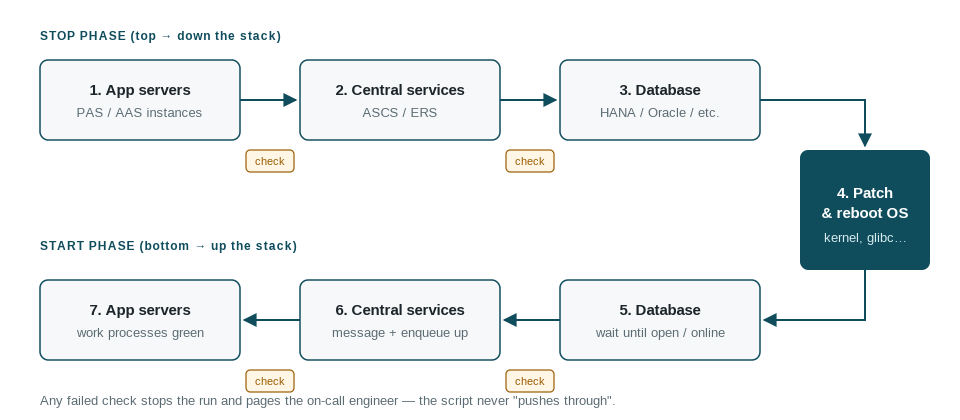
I wrote a Bash orchestrator with three principles:
- Declarative order, imperative execution. A small per-landscape config lists instances in stop order. Start order is simply the reverse — so there is only one list to keep correct.
- Every action is followed by a wait-and-verify. I used
sapcontrol’s own exit codes rather than parsing text:GetProcessListreturns3when all processes are running (GREEN) and4when all are stopped. - Fail closed. Any unexpected state exits non-zero with a clear message, leaves the system where it is, and is picked up by the patching job as a failure for on-call to review.
A simplified, sanitised version of the core loop:
#!/usr/bin/env bash
# Ordered SAP stop — simplified extract. Real script adds logging, locking and a dry-run mode.
set -Eeuo pipefail

TIMEOUT=900   # seconds to wait for a layer to reach the target state
POLL=10

# Instances in STOP order: app servers -> central services -> database
# format: <host>:<instance_nr>:<label>
INSTANCES=(
  "app02:01:AAS"
  "app01:00:PAS"
  "cs01:10:ASCS"
  "db01:02:DB"
)

state_of() {  # echo 3 = all GREEN, 4 = all stopped, other = mixed/unknown
  local host=$1 nr=$2 rc=0
  ssh -o BatchMode=yes "$host" "sapcontrol -nr $nr -function GetProcessList" >/dev/null 2>&1 || rc=$?
  echo "$rc"
}

wait_for() {  # wait_for <host> <nr> <expected_rc>
  local host=$1 nr=$2 want=$3 waited=0
  until [[ "$(state_of "$host" "$nr")" == "$want" ]]; do
    (( waited >= TIMEOUT )) && { echo "FAIL: $host/$nr did not reach state $want in ${TIMEOUT}s" >&2; return 1; }
    sleep "$POLL"; (( waited += POLL ))
  done
}

for entry in "${INSTANCES[@]}"; do
  IFS=: read -r host nr label <<<"$entry"
  echo "Stopping $label on $host (nr $nr)"
  ssh -o BatchMode=yes "$host" "sapcontrol -nr $nr -function Stop" >/dev/null
  wait_for "$host" "$nr" 4      # gate: do not touch the next layer until this one is fully down
done
echo "All SAP layers stopped cleanly — safe to patch and reboot."
The start path walks the same array in reverse and waits for state 3 (all GREEN) at each step.
Alternatives I considered
| Option | Why not (for this estate) |
|---|---|
sapcontrol -function StopSystem ALL from ASCS |
Handles ordering within one system, but didn’t cover the database layer or the SMEs’ requirement for explicit per-layer confirmation across hosts. |
| Pacemaker / HA cluster resource ordering | Correct tool for HA-clustered SAP, but these systems were not clustered; introducing a cluster just for patching was out of proportion. |
| Ansible playbook only | Ansible runs the script across hosts during patching, but the wait-and-verify logic is clearer and easier for SAP engineers to review as one readable script. |
Rollout
- Ran in dry-run mode (prints every command, executes none) alongside the manual process for a cycle so the SAP team could compare it line by line with their runbook.
- Enabled on Dev, then QA, then Prod, one patch cycle each, with the SAP engineer still on the call.
- Wired into the patching workflow so a non-zero exit blocks the reboot and raises an incident.
What I learned
- The most valuable part was not the automation; it was writing the SMEs’ tacit knowledge down as an explicit, testable order and a definition of “healthy”.
- Exit codes beat screen-scraping. If a vendor tool gives you a machine-readable status, build on that.
- Automation earns trust through dry runs and side-by-side comparison, not through a demo.