Keeping 350 RHEL servers honest: Satellite registration and monthly licence hygiene
Registration drift is quiet until a licence true-up or an unpatched server finds it for you. A simple monthly routine with Red Hat Satellite and hammer keeps the inventory accurate.
The scenario
- Situation
- Ahead of a subscription review, the number of hosts registered in Satellite didn't match the number of RHEL servers the CMDB said were running.
- Environment
- Mixed on-prem and AWS RHEL estate; hosts rebuilt from templates; Satellite with Dev, QA and Prod lifecycle environments.
- Goal
- Get to a trustworthy registered-host list, and keep it that way every month with minimal effort.
- Outcome
- A monthly export-and-reconcile routine that flags stale, duplicate and unregistered hosts before they become licence or patching problems.
In a large RHEL estate, registration drift happens quietly. A VM is rebuilt with the same hostname and now appears twice. A server is decommissioned but never unregistered. A rushed build skips registration and never receives patches. None of these break anything on the day — they surface later, during a licence true-up or when a vulnerability scan finds an unpatched host nobody knew about.
The routine
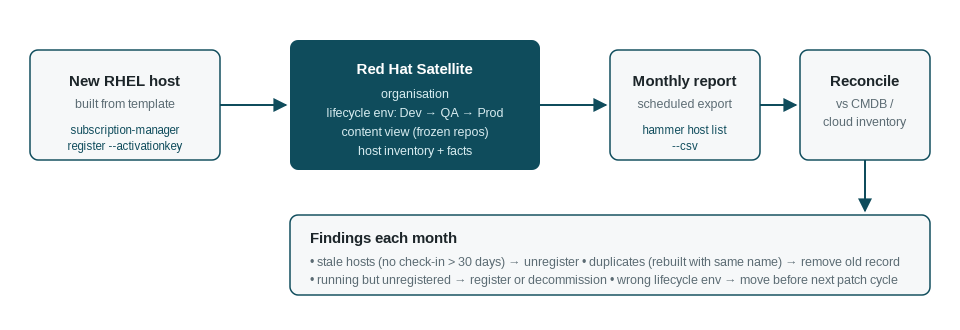
1. Register consistently — always with an activation key
Activation keys bind a host to the right organisation, lifecycle environment and content view in one step, so builds don’t depend on someone remembering the right options.
# Install the Satellite CA/consumer package, then register (run on the new host)
sudo rpm -Uvh https://satellite.example.internal/pub/katello-ca-consumer-latest.noarch.rpm
sudo subscription-manager register \
    --org="EXAMPLE_ORG" \
    --activationkey="rhel9-prod"
sudo subscription-manager identity    # confirm registration
Put this in your build template or provisioning playbook so it isn’t optional. On newer Satellite versions, the
global registration command generated from the web UI does the same job with a single curl | bash.
2. Export the inventory monthly
hammer, Satellite’s CLI, makes the export scriptable:
hammer --output csv host list \
    --organization "EXAMPLE_ORG" \
    --fields "Name,Operating System,Lifecycle Environment,Content View,Last Checkin" \
    > "satellite-hosts-$(date +%Y-%m).csv"
Keeping one CSV per month gives you a simple history: you can diff months to see what was added and removed.
3. Reconcile against what should exist
Compare the Satellite list with your source of truth (CMDB export, VMware inventory, or aws ec2 describe-instances).
A few lines of shell are enough to find the gaps:
#!/usr/bin/env bash
# reconcile.sh <satellite.csv> <cmdb_hosts.txt>  — hostnames one per line in the second file
set -euo pipefail
[[ $# -eq 2 ]] || { echo "usage: $0 satellite.csv cmdb_hosts.txt" >&2; exit 2; }

tail -n +2 "$1" | cut -d, -f1 | sed 's/\..*//' | tr 'A-Z' 'a-z' | sort -u > /tmp/sat.txt
sed 's/\..*//' "$2" | tr 'A-Z' 'a-z' | sort -u > /tmp/cmdb.txt

echo "== Running but NOT registered (no patches, no entitlement) =="
comm -13 /tmp/sat.txt /tmp/cmdb.txt
echo
echo "== Registered but NOT in CMDB (decommissioned? paying for nothing) =="
comm -23 /tmp/sat.txt /tmp/cmdb.txt
Short hostnames are compared, lower-cased, so APP01.example.internal and app01 match.
4. Act on the findings
| Finding | Typical cause | Action |
|---|---|---|
| No check-in for 30+ days | Host decommissioned or powered off | Confirm, then hammer host delete |
| Same name registered twice | Rebuilt from template | Remove the older record |
| Running but unregistered | Build skipped registration | Register with the correct activation key |
| Wrong lifecycle environment | Built with the wrong key | Move it before the next patch cycle |
Why bother?
- Licensing: the registered-host count is what you’ll be asked to justify.
- Security: an unregistered host doesn’t get content-view updates — it’s effectively unpatched.
- Trust: when the inventory is right, every other report built on it (patch compliance, vulnerability exposure) is right too.